
Download Comic Icons – Comic Book Art, Desktop Personalization, Icon Pack, Stylish UI
Overview
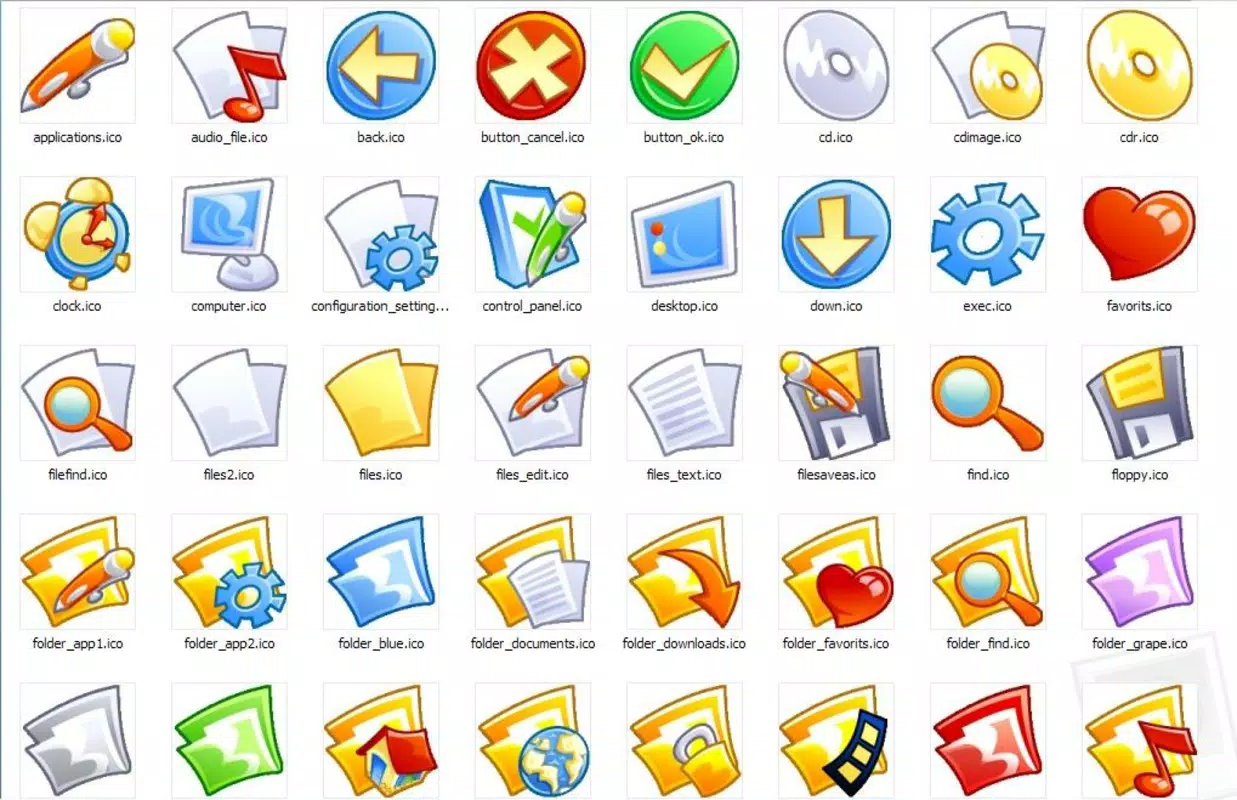
Comic Icons presents a curated collection of 72 unique digital icons designed to reflect the dynamic spirit of comic book artistry. The app serves as a visual enhancement tool for users seeking to personalize their digital environments with a bold, expressive aesthetic. Each icon is crafted with vibrant colors and stylized graphics, aiming to bring the energy of comic panels into everyday computing. Targeted primarily at comic enthusiasts and design-conscious users, Comic Icons offers a way to transform standard desktop interfaces into immersive, themed spaces. The app does not function as a standalone application but rather as a resource pack for icon customization, likely intended for use with compatible desktop environments or third-party tools. While the developer did not provide additional background, the release date of February 1, 2007, suggests it has been a long-standing resource in niche digital customization communities. Its enduring presence indicates a dedicated user base that values distinctive visual identity. Real-world use cases include enhancing personal workspaces, creating themed folders for media collections, or simply expressing individuality through digital design. In the broader app ecosystem, Comic Icons occupies a specialized niche—serving as a utility for visual personalization rather than functional productivity. It fills a gap for users who prioritize aesthetics and fandom in their digital experience.Key Features & Functionality
- Diverse Icon Selection: The collection includes 72 distinct icons, each representing a different function or category. From system tools like 'Control panel' to personal favorites, the variety ensures broad usability across multiple digital contexts. This range allows users to maintain both organization and visual flair.
- Clear Naming Convention: Every icon is labeled with a descriptive name that clarifies its intended use. This feature reduces cognitive load, enabling users to quickly identify and assign icons without confusion. It enhances usability, especially for those integrating the pack into file folders or desktop shortcuts.
- High-Quality Graphics: The icons are rendered with attention to detail, featuring bold outlines, dynamic shading, and a vivid color palette. These visual effects mirror the techniques used in traditional comic book illustration, contributing to a cohesive and striking aesthetic.
- Desktop Personalization: Designed specifically for interface customization, Comic Icons allows users to refresh their desktop environments with a unique, themed look. This functionality appeals to users who view their digital workspace as an extension of their personal style.
- Perfect for Comic Fans: The artistic style is deeply rooted in comic book culture, making it ideal for fans who wish to showcase their passion. Whether used on a personal computer or shared within fan communities, the icons serve as a visual tribute to comic art.
Interface, UX & Performance
The interface of Comic Icons is not a standalone application but rather a static asset pack. As such, it does not feature interactive screens, menus, or navigation flows. Instead, users are expected to manually integrate the icons into their operating system or desktop environment using external tools. The visual style is consistent throughout the collection, characterized by high-contrast graphics, exaggerated proportions, and a comic-inspired color scheme. This design approach ensures visual harmony across all 72 icons. Although the developer did not list formal performance metrics, the file size and static nature of the asset pack suggest minimal system impact during use. The icons are likely optimized for standard display resolutions, ensuring clarity on various screen types. Responsiveness is not a concern since the app does not run in real time. Stability is expected to be high, given the static file format and lack of runtime processes. Users may experience varying levels of ease depending on their familiarity with icon replacement tools. However, the clear naming convention and consistent design reduce the learning curve. Overall, the UX is functional and efficient, relying on user initiative rather than built-in guidance.Platform Compatibility & Technical Requirements
Comic Icons is available for desktop operating systems, though specific platform details were not provided. The app was released on February 1, 2007, and its file size is not listed. The developer did not specify minimum OS requirements or compatibility with modern versions of Windows, macOS, or Linux. As such, users should verify whether the icon format (e.g., PNG, ICO) is supported by their system. Compatibility information was not fully disclosed, and no official updates have been reported since the release date. Users may need to rely on third-party tools to apply the icons. The lack of recent updates suggests the app may not be optimized for current operating system standards, though its core functionality remains intact for legacy environments.Pros and Cons
- Unique comic book-inspired visual style
- 72 diverse icons with descriptive names
- High-quality graphics with vibrant colors
- Ideal for comic enthusiasts and personalization lovers
- Minimal system resource usage
- No official support for modern OS versions
- Requires external tools for installation
- No official updates since 2007
- File size and format details not disclosed
- Not a standalone app with built-in interface


